When Your AI Chatbot Should Shut Up and Call a Human
Picture this: A customer's order arrived damaged. They're frustrated. They message your chatbot asking for help. The AI cheerfully says "I'd be happy to help! Let me look that up for you!" Then it tries to explain your return policy. The customer says "No, I need to talk to someone NOW." The AI responds with "I understand! Here's how our returns work..." The customer types in all caps: "HUMAN. NOW."
We've all seen this trainwreck. The AI keeps trying to help when it should've handed off three messages ago. The customer gets angrier. Eventually they leave a 1-star review about your "useless chatbot" and your "company that hides behind robots."
Here's the truth: Your AI chatbot isn't bad. It just doesn't know when to stop talking.
The 3 Signals Your AI Should Watch For
A good AI chatbot needs to recognize when it's out of its depth. There are three big red flags that scream "hand this off to a human right now."
1. Angry Sentiment
When someone uses all caps, curse words, or phrases like "this is ridiculous" — they're past the point of wanting an automated answer. They want empathy and action. AI can't really do either.
2. Explicit "I want a human" requests
This one's obvious, but you'd be shocked how many chatbots ignore it. "Talk to a person," "real human," "agent," "representative" — if someone asks, just do it. Don't make them ask twice.
3. Going in circles
Customer asks the same question twice in slightly different words? The AI already failed to answer it properly the first time. Hand it off before they get frustrated.
Common mistake:
Setting handoff rules but only checking them at the start of the conversation. Check them after every single message. Sentiment can change fast.
Real E-Commerce Scenarios Where Handoff Isn't Optional
Let's get specific. There are certain situations where AI just can't help, no matter how smart it is. If you try to automate these, you're asking for trouble.
Wrong Item Received
Customer ordered a blue sweater, got a red one. Your AI can explain the return policy all day, but someone needs to actually process the replacement. This requires human judgment — maybe it's a picking error, maybe it's a supplier issue, maybe you want to send a replacement immediately without waiting for the return.
Don't make them fight a chatbot to get this resolved.
Billing Disputes
"I was charged twice" or "My discount didn't apply" are not AI territory. This is legal and financial stuff. One wrong move and you're in chargeback land. Hand these off immediately.
Pro tip:
Set up keyword triggers for anything payment-related: "charge," "refund," "credit card," "billing," "overcharge." These should auto-pause AI and notify your team immediately.
Complex Product Customization
"Can I get this in a custom size?" or "Do you do bulk orders with logo printing?" — these aren't FAQ questions. They're sales opportunities that need a human touch. Your AI might technically be able to explain your custom order process, but it can't negotiate, upsell, or build rapport.
Threatening to Leave a Bad Review
"I'm about to leave a 1-star review on Google" — sentiment detection should catch this. Even if the customer's complaint is small, the potential damage isn't. Get a human on it before they're typing that review.
How We Built Handoff at FunctionalAI
Okay, I'll be transparent here — we make an AI chatbot for Shopify, so this is literally our job. But I'll try to explain how we approached this problem in a way that's useful even if you're using a different platform.
The core concept: Every message gets an evaluation score.
After your AI responds, we run it through an evaluator that checks:
- Did the customer use any handoff keywords? ("human," "agent," "representative")
- What's the sentiment of their last message? (angry, frustrated, neutral, happy)
- Have they asked the same question multiple times?
- Did they mention anything in your custom handoff rules? (billing, defect, complaint)
If any of these triggers fire, we auto-pause the AI and notify you. Here's what that looks like:
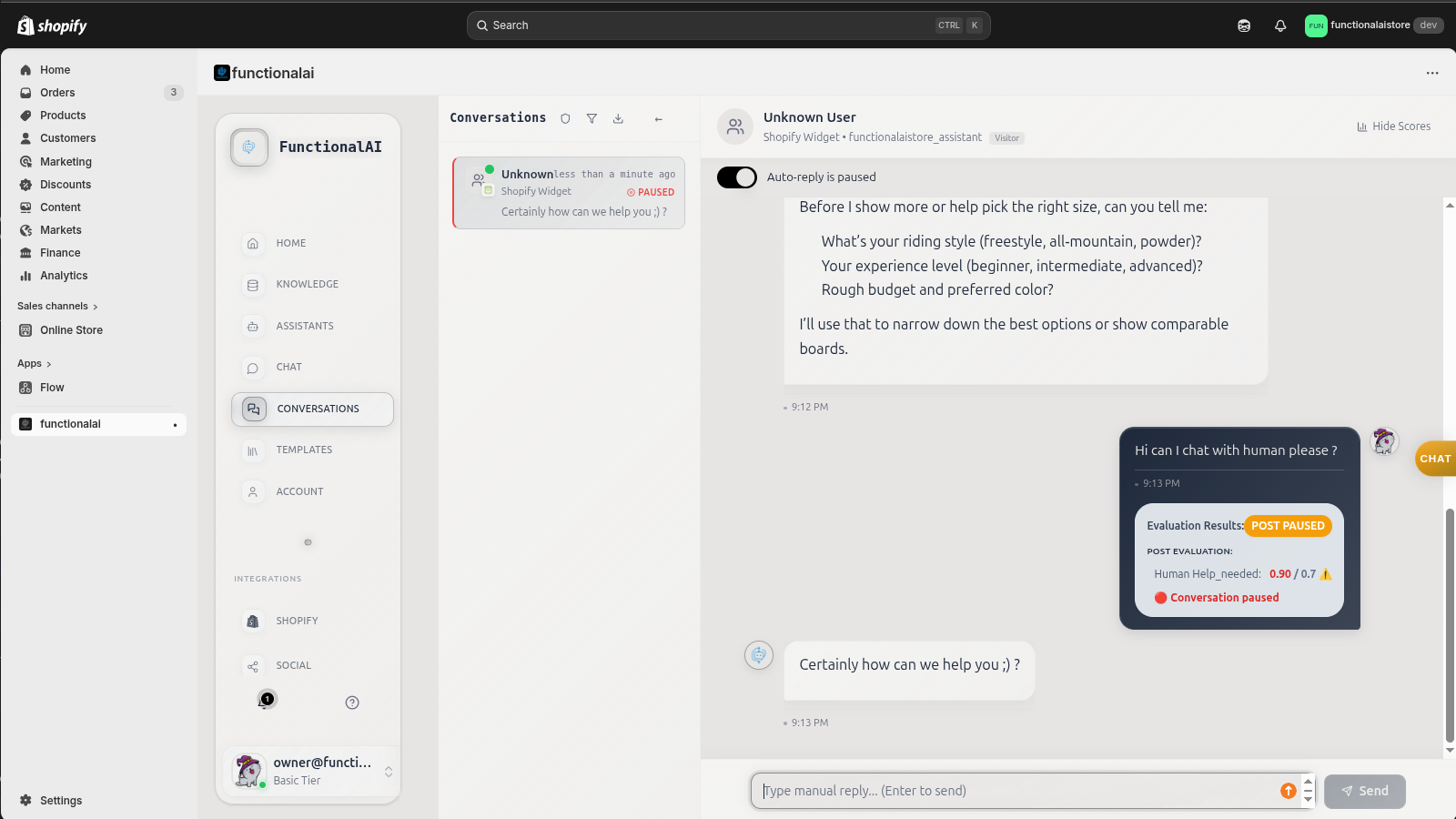
The evaluation scores show up right in the conversation. You can see exactly why the AI decided to hand off. No black box. No mystery. "Customer mentioned billing (80% confidence), sentiment detected as frustrated (65% confidence)" — stuff like that.
You can configure the thresholds. Some stores want aggressive handoff (pause at the first sign of trouble), others want to let AI handle more. That's a business decision, not a technical one.
Pro tip:
Start with aggressive handoff rules when you first launch. It's better to over-handoff and learn what your AI can actually handle. After a few weeks, you'll see patterns and can relax the rules where appropriate.
The Safety Net: Auto-Pause After X Messages
Here's something a lot of chatbot platforms don't talk about: Sometimes your rules miss things. Sentiment detection isn't perfect. Keyword matching isn't perfect. So you need a safety net.
The simple solution: Set a max message count.
If a conversation goes beyond, say, 10 messages back-and-forth without resolution, something's wrong. Either the AI doesn't understand what they want, or it's a complex issue that needs a human. Automatically pause and notify your team.
Think of it like this: If you were the customer and you'd sent 10 messages without getting what you need, you'd be annoyed too. Don't let it get to that point.
Be Honest: No AI Is Perfect
I'm going to say something that might hurt AI chatbot companies to admit: Your AI will mess up. Ours does too. The question isn't whether it'll happen — it's whether you have a plan for when it does.
The best chatbot setups I've seen don't try to make AI do everything. They use AI to handle the repetitive stuff ("Where's my order?" "What's your return policy?") and hand off the complicated, emotional, or high-stakes conversations to humans.
That's not AI failing. That's AI working exactly as intended.
What Handoff Actually Looks Like for Your Team
Let's talk about the practical side. When your AI hands off a conversation, what happens next?
You get notified. Email, Slack, dashboard alert — however you want it. The notification should tell you why it handed off. "Customer mentioned refund" is way more helpful than just "new conversation needs attention."
You see the full context. The whole conversation history is right there. You don't have to ask the customer to repeat themselves. You can jump in with "I see you received the wrong item — let me get that fixed for you right now."
The customer knows what's happening. When AI pauses, it should tell them: "I'm connecting you with our team for help with this. Someone will respond shortly." Don't leave them hanging wondering if anyone's listening.
And when you reply? The customer gets it in real-time, right in the same chat widget. No switching to email. No separate ticketing system. Just a smooth handoff.
The Bottom Line
AI chatbots are amazing for handling repetitive questions at scale. But they're terrible at reading the room, showing empathy, and making judgment calls. That's what humans are for.
The stores that get this right don't try to replace humans with AI. They use AI to free up humans for the conversations that actually need them.
Set up your handoff rules. Test them. Adjust them. And for the love of customer satisfaction, don't let your AI keep talking when a customer's already asking for a human.
See Human Handoff in Action
We built FunctionalAI with human handoff as a core feature, not an afterthought. Auto-pause rules, sentiment detection, real-time agent replies — it's all included. Want to see how it works on your Shopify store? Try it free.